
Build Lab case study

Business Automation & Workflow Dashboard

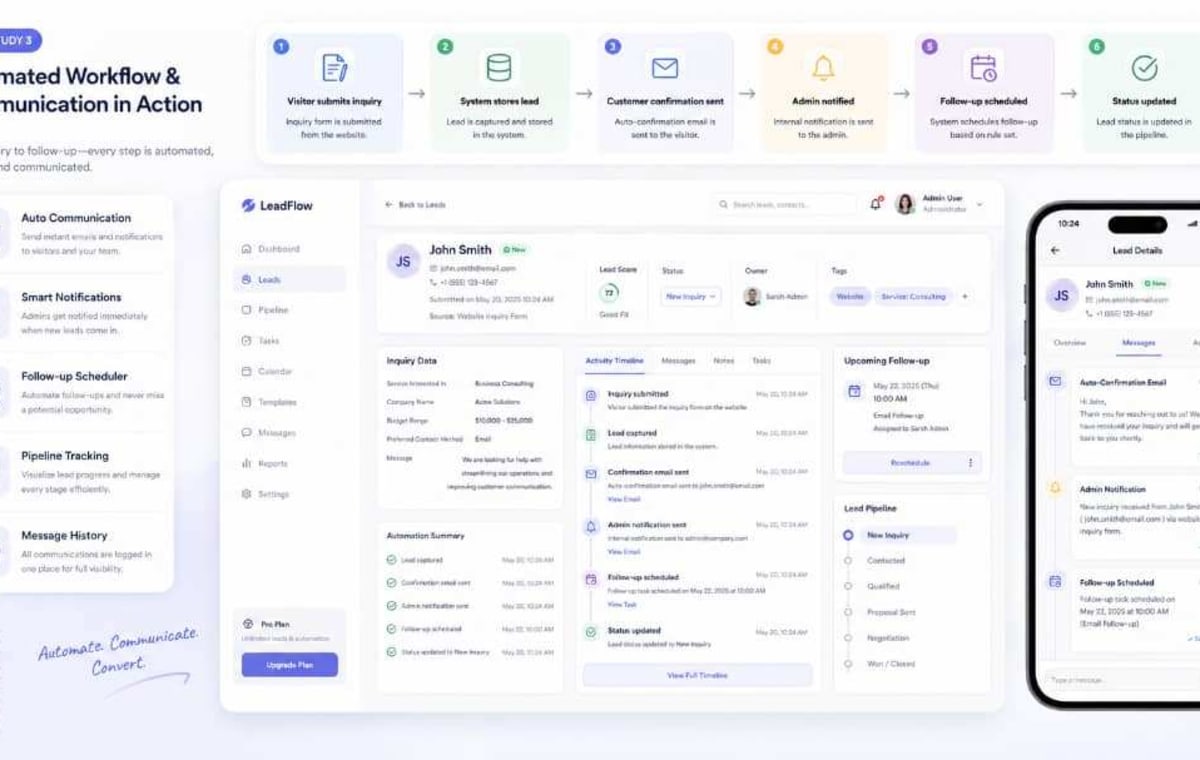
A workflow dashboard for service-based SMEs that captures inquiries, sends confirmations, tracks lead status, triggers notifications, and helps business owners stop managing follow-up manually.

dashboardin progressadvancedService-based SMEs / automation / operations
Business Automation & Workflow Dashboard

Stack

Next.js App Router • TypeScript • Prisma • PostgreSQL

Context

A workflow dashboard for service-based SMEs that captures inquiries, sends confirmations, tracks lead status, triggers notifications, and helps business owners stop managing follow-up manually.

Problem

Service businesses often receive leads from contact forms, WhatsApp, social media, referrals, and phone calls. Without a workflow system, leads are forgotten, follow-ups become inconsistent, and business owners cannot easily see what is new, pending, contacted, won, or lost.

Solution

Create a central automation dashboard where inquiries are stored, categorized, assigned a status, followed up through email or admin action, and tracked through a simple pipeline from first contact to completion.

Who it is for

Consultants, agencies, tutors, clinics, schools, service providers, repair businesses, logistics operators, event vendors, real estate agents, and SMEs that receive leads and need a better follow-up system.

Technical snapshot

Next.js App Router
TypeScript
Prisma
PostgreSQL
Admin dashboard
Email notifications
Lead status pipeline
Notification logs
Role-based admin flow
Tailwind CSS

Status

in progress

Difficulty

advanced

Repo

private

Core features

Core features behind the case study.

This section turns the project from a simple portfolio item into a useful breakdown visitors can understand.

Public inquiry capture with useful business context instead of a weak contact form.

Automatic customer confirmation after inquiry submission.

Admin notification when a new lead arrives.

Lead status pipeline for New, Reviewed, Contacted, Qualified, Won, Lost, and Closed.

Dashboard summary cards for active, pending, and completed work.

Lead source tracking to understand where inquiries come from.

Budget range and timeline capture for better qualification.

Notification log for sent confirmations and admin alerts.

Admin filtering by status, service type, date, and source.

Foundation for follow-up reminders, CRM notes, and automated email sequences.

Better separation between content management and business workflow management.

Architecture

How the system is structured.

Website inquiry form ↓ API route / server action validation ↓ Inquiry record saved in PostgreSQL ↓ Customer confirmation email ↓ Admin notification email ↓ Dashboard pipeline: New → Reviewed → Contacted → Qualified → Closed ↓ Notification log and activity timeline ↓ Admin reporting and lead source analysis

Implementation

Key build decisions.

1. Inquiry capture: Use a public form that collects name, email, phone, project type, budget range, timeline, message, and source. 2. Confirmation layer: Send a confirmation email to the customer and a notification email to the admin. 3. Pipeline model: Use clear statuses so every lead has a state. 4. Admin dashboard: Show cards for new leads, pending follow-ups, contacted leads, and closed leads. 5. Activity notes: Allow admin to add notes or internal remarks later. 6. Notification log: Store what messages were sent and whether they succeeded. 7. Reporting: Summarize lead sources, popular project types, budget ranges, and response patterns.

Business value

Why it matters.

The value is operational control. The business owner gets a clear view of every inquiry and its current state. This improves response time, reduces forgotten leads, increases conversion opportunities, and creates a professional customer experience from the first message.

Challenges

Challenges behind the case study.

This section turns the project from a simple portfolio item into a useful breakdown visitors can understand.

Designing a workflow that is simple enough for small businesses but flexible enough for different service types.

Avoiding a dashboard that looks busy but does not help the admin take action.

Making statuses clear so the business owner knows what each stage means.

Handling email delivery reliability and storing logs for debugging.

Preventing duplicate leads while still allowing repeat inquiries from serious prospects.

Creating a workflow that can later expand into a CRM without becoming over-engineered.

Lessons learned

Lessons learned behind the case study.

This section turns the project from a simple portfolio item into a useful breakdown visitors can understand.

Business owners understand workflow value faster than technical dashboard language.

The best admin systems are built around actions, not just data tables.

A simple status pipeline can dramatically improve lead follow-up discipline.

Every automated message should be logged for trust and debugging.

Lead source tracking is important because it tells the business where marketing effort is working.

Automation should reduce mental load, not create more screens to manage.

Selected visuals

Interface atmosphere and workflow direction.

Business Automation & Workflow Dashboard gallery image

Business Automation & Workflow Dashboard gallery image

Business Automation & Workflow Dashboard gallery image

Business Automation & Workflow Dashboard gallery image

Outcomes

What the project improves beyond surface-level appearance.

The strongest work usually creates better clarity, better decision-making, stronger trust, and better operational flow.

Turns scattered customer inquiries into a structured business pipeline.

Reduces missed follow-ups by giving every lead a visible status.

Improves professionalism through automatic customer confirmations.

Helps the business owner see pending work, active conversations, and closed opportunities.

Creates a foundation for CRM features, notifications, lead scoring, and automation rules.

Follow the Build Lab

Want more case studies like this?

Subscribe and I’ll send you new builds, lessons, and practical breakdowns when fresh case studies go live.

Receive new insights and case studies

Get notified when Oliseyenum publishes new posts, Build Lab case studies, and practical updates on systems, data, and learning.

Helpful?

Like this build or ask a question.

Likes help me know which systems people care about. Comments are moderated before showing publicly.

Ask a question

Comment or ask about this build.

Ask how it was built, how it could apply to your business, or what part you want explained.

Related builds

Explore similar case studies.

These related builds help visitors move deeper into the kind of systems, dashboards, and workflows you can create.

Student Performance Analysis for Schools and Tutors
dashboardplanned

Education / schools / tutoring analytics

Student Performance Analysis for Schools and Tutors

An education analytics case study that uses student scores, topic performance, attendance patterns, and progress trends to identify weak areas and recommend better learning support.

ExcelGoogle SheetsPythonSQL
Sales & Lead Data Analysis Dashboard
dashboardplanned

SMEs / sales analytics / business intelligence

Sales & Lead Data Analysis Dashboard

A business intelligence case study that shows how SMEs can analyze leads, sources, conversion stages, budget ranges, and customer behavior to make better marketing and sales decisions.

ExcelGoogle SheetsSQLPostgreSQL